What is a capsule?
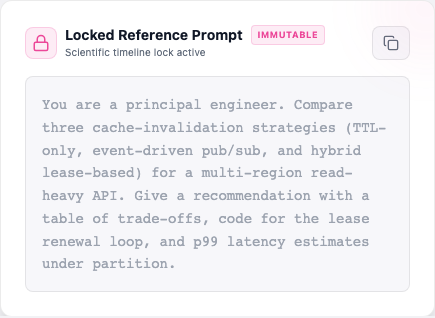
A capsule is one question, locked so it can never change, plus every answer any model has ever given to it.
That locking is the whole point. If the question stays exactly the same, then an answer from today and an answer from next year can be compared honestly — the difference comes from the model getting better or worse, not from you having reworded the question along the way.
 Full size
 The one thing to know before you start
A capsule stays editable until you run it for the first time. That first run seals the question, the files attached to it, and your checklist — for good. Nothing can unlock them afterwards.
You can still rename it, recategorise it, edit your notes and change who can see it. But if you want to try a different wording, make a new capsule: that way you keep both, and you can compare them.
Create your first capsule
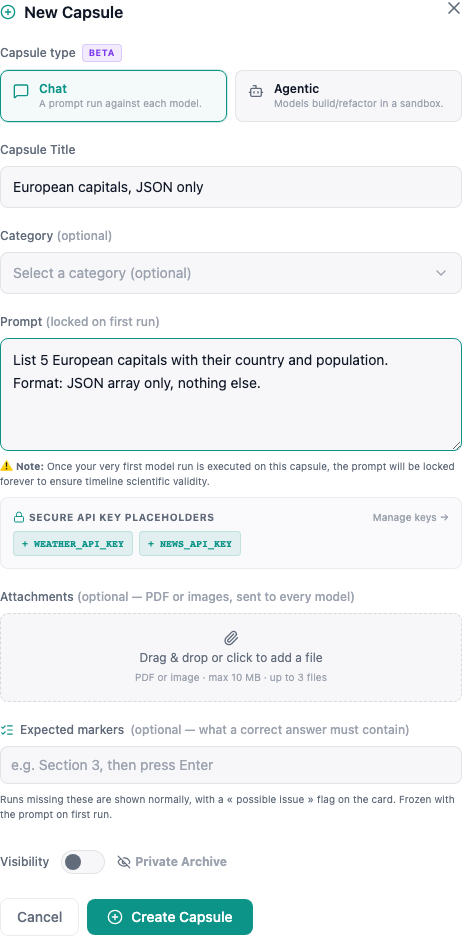
On your dashboard, click New Capsule. Only a title and a question are required — but the optional fields are what turn a one-off test into something worth re-running in a year.
 Full size
 Title
The name you will recognise it by. You can change it whenever you like.
Prompt
Locked on first runThe exact question every model will be asked. This is the part that gets frozen, so it is the part worth taking time over.
System prompt
Locked on first runOptional, under "Advanced". A standing instruction sent ahead of your question every time — a role to play, a format to follow, a limit to respect. It freezes with the prompt, so it is part of the sealed question, not a setting you tune later.
Category
Helps people find your capsule if you make it public. Optional, and changeable later.
Visibility
Private capsules are yours alone. Public ones show up in Explore and can be read by anyone. You can switch either way at any time.
Attachments
Locked on first runUp to 3 PDFs or images, 10 MB each, sent to every model along with your prompt — handy for "summarise this report" style questions.
Expected markers
Locked on first runWords or phrases a good answer should contain. If an answer misses them, the run gets a small warning so you can spot it at a glance. You decide whether all of them are required, or just one.
Writing a question worth locking
The best questions are the ones models answer differently. If they all say the same thing, you learn nothing. Be strict about the shape of the answer you want — ending with something like Answer with a JSON list and nothing else. gives you results you can actually line up next to each other. And note down what a right answer must mention: those become your checklist.
Two things the capsule fills in for you
A sealed question can still say something different to each model. Drop {{VAR:MODEL_ID}} into your prompt (or your system prompt) and each model reads its own name there; {{VAR:RUN_DATE}} becomes the day the run happened. Buttons under both fields insert them for you. Every result keeps a copy of the exact wording it was given, so nothing about the comparison becomes guesswork later.
The name a model reads is its exact build, not just its family. Vendors reuse one name across releases — the April and the July DeepSeek V4 Flash answer to names that look nearly identical — so the model is told which dated build it is, and the result records it. Pick a latest entry in the model list and you get the build it points to today: handy, but that pointer moves, which is why every result keeps the name of the one that actually answered.
The three kinds of capsule
Most capsules are chat capsules: you ask, the model answers, you compare answers. An agentic capsule is a different exercise — instead of answering, each model actually goes off and builds the thing you described. In a Relay, the models take turns on one piece of work, each improving the version before. You pick which kind at creation, and it cannot be changed later.
| Chat | Agentic | Relay | |
|---|---|---|---|
| You give it | A question | A job to do | A piece of work to write and rewrite |
| The model gives back | An answer, or an image | Working files — a page, an app, a game | A better version of the last one |
| How long | Seconds to a few minutes | Half an hour or more | Seconds to a few minutes per step |
| What it costs | Only the model | The model, plus the machine it works on | Only the model, a little more each step as the text grows |
| Who can use it | Everyone | Invited accounts only, for now | Invited accounts only, for now |
Agentic and Relay capsules are still invitation-only
If you do not see a Chat / Agentic / Relay choice when you create a capsule, that is why — they are open to a small group while we make sure they are safe and predictable. Everything else on this page works for everyone.
Run it against a model
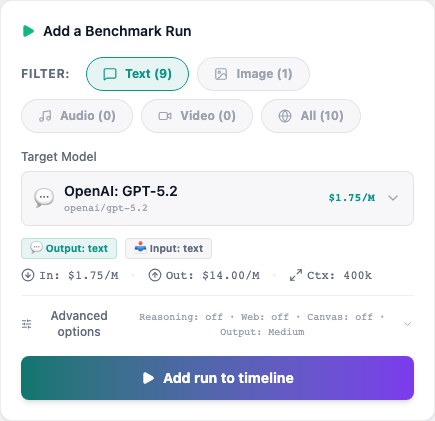
You use your own OpenRouter account, which you connect once in Settings. That gives you hundreds of models — the big names and the open-source ones — and you pay them directly, at their price, with nothing added on top.
 Full size
 The request goes straight from your browser to the model. Nothing passes through us, which is good for your privacy — and worth knowing for one practical reason: the run lives in your open tab. You will see the answer appear as it is written, and a model that genuinely needs six minutes to think will get them.
Four things you can adjust
Thinking
Some models can reason through a problem before answering. You choose how hard they think, from a light pass to an exhaustive one — deeper thinking usually means better answers, more time, and a bigger bill. You can also let the model think privately and only keep its final answer.
Web search
Lets the model look things up online before answering, which matters for anything recent. It costs a little extra, and the result card tells you whether the model really searched or just answered from memory.
Canvas
Ask for a working web page instead of text. You can then open what each model built and click through it — the fastest way to see the gap between two models on the same brief. Nothing runs until you press play.
Answer length
A ceiling on how long the answer may be. Leave it on Auto for normal questions; raise it for long documents or code. A cut-off answer almost always means this was set too low, and you can pick your own default in Settings.
If you close the tab by accident
Your run will not vanish. We warn you before you leave while one is still running, and if it does get interrupted you come back to a clear interrupted card with a Retry button — never a blank result pretending everything went fine.
Agentic capsules
Here you are not asking a question, you are handing out a job: build me a page that does this. Several models take it on at the same time, each on its own, and you get back what they actually built. This one does not live in your tab — close it, come back an hour later, the work carries on without you.
Two ways to give the job
From scratch
Just your brief. The model builds from nothing — a page, a small app, a game — and you can open the result and use it right there.
On an existing project
Point at a public GitHub project (up to 200 MB) and ask for a change: add a feature, fix a bug, make the tests pass. Each model works on its own fresh copy, and what you get back is the change itself, not a page. Nothing is pushed to your GitHub, unless you set up a Relay that pushes.
What happens once you start
It gets a workspace
Each model receives its own private machine, walled off from everything else.
It works on its own
It reads, writes files and runs commands, checking its own work, until it decides the job is done. It can search the web and read any page when it needs to; each search is a small charge on your key. Every model gets the same tools, so the only thing being compared is the model.
The result is kept
Every file it made is saved, along with a full log of what it did and how long it took.
The workspace is destroyed
Nothing is left running once the job is over.
You are never left without a brake
A model working on its own for half an hour can waste a lot of money if it goes wrong. Five limits stop that happening:
- A spending limit per model, set before you start: $1, $3, or your own figure (minimum $0.50). Work stops when the limit is reached.
- A hard stop after 2 hours, whatever happens.
- If a model goes quiet for 20 minutes, the job is ended rather than left to burn through the clock. The card warns you long before that.
- A Stop button, so you can end a job the moment you see it going nowhere.
- One comparison at a time: as many models as you like on one capsule, but not two capsules at once.
What you get back
 Full size
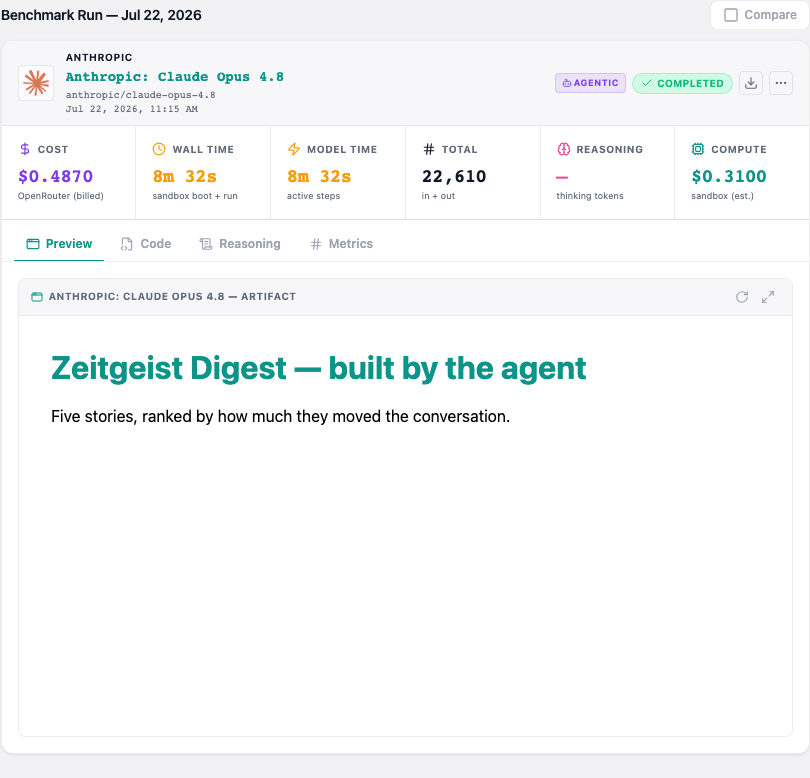
 Preview shows the finished thing, working. Code lets you read every file. Web, when the model used the web, lists what it searched, the pages it read (and those that failed), and which of them the result links to; LLM TimeMachine records this itself, so it is not the model's account. Reasoning replays what the model did, step by step. And the download button packages the lot into a zip, so you can carry on from where the model stopped.
On a GitHub project, the card shows Changes instead: every file the model touched, line by line, with what the model says it did and a button to download the change as a patch. Checks shows what LLM TimeMachine did around the model, without taking its word for it: it installed the project, ran its build and tests before the model started and again after (or the check command you gave), and made sure the change applies cleanly to the original project. Warnings appear above the change when the model deleted files, touched deployment settings, changed the tests instead of passing them, or broke a check that used to pass.
An External label means the result pulls something off the internet to work — a font, an icon set. It is a note, not a failure.
Relay capsules Invitation-only
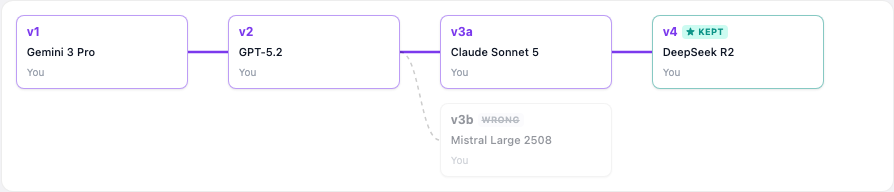
In a Relay the models do not each answer on their own: they take turns on the same piece of work, like runners passing a baton. The first model answers your prompt. Every model after it gets your prompt and the latest version, improves it, and says what it changed. It suits work that gets better with several passes — an article, a piece of code, a translation.
 Full size
 Adding a step
Pick a model and press Improve. You can add a short instruction for that step alone — Add numbers, Make it shorter. The model receives your prompt, the version it starts from, and the notes the earlier models left along that branch. It never sees the other branches.
Your prompt is the only one you write: the wording that asks each model to improve the last version is ours, and every step shows in full what it was sent.
Branches
You can continue from any finished version, so the work can split: v3a and v3b are two versions built on v2. If you do not choose, the next step continues from the version you kept, or else from the newest version that looks sound. That branch is the one highlighted in the tree. A List button shows the same versions as ordinary result cards.
Reading a version
 Full size
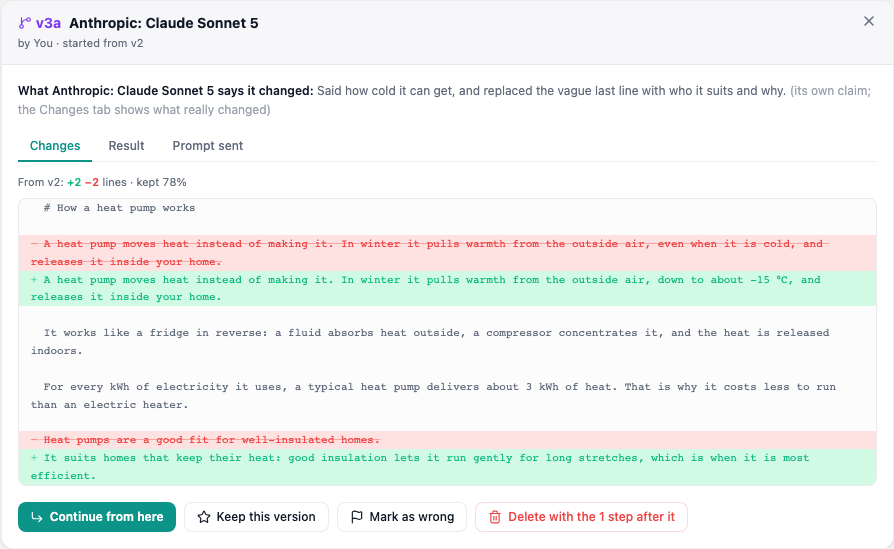
 Changes shows what really changed, in red and green. Result is the version itself; Read as article opens it full screen, laid out like an article, with a check of every source link when you are signed in. Web, on a step launched with web search, lists what the model searched and the sources it cited, or says it did not search. Prompt sent is exactly what the model received. What a model says it changed is labelled as its own claim: the red and green lines are what to trust.
On a GitHub project
A Relay can also work on code. Pick Relay, then GitHub repo, and give a public repository. Each step runs like an agentic job: the model gets its own machine with the project as the steps before it left it. Their changes are replayed as commits, one per step, signed by the model that made it, so it can read who did what with git log. You give each step a role (add a feature, fix, review), and several models launched together make sibling versions you can compare.
A version shows the change to the code, the build and tests LLM TimeMachine ran before and after the model, what it searched and read on the web, and the brief it was sent. A step that breaks tests which passed before it is marked as broken and is not used as the next starting point unless you choose it. Warnings also say when a step removed lines the step before it had added, or deleted a file an earlier step created. Every change can be downloaded as a patch.
Pushing to GitHub
Tick Push each step to GitHub when you create the Relay, and every finished step becomes a commit on a relay/… branch of your repository, authored by the model that made it, for example DeepSeek V4 Flash (via LLM TimeMachine). It is automatic: there is nothing to click after each step. The choice is made once, at creation.
- The first line of versions goes to
relay/<capsule>/main, and each step built on the end of it moves that branch forward. - A sibling version, or a step continued from a version in the middle, gets a branch of its own, such as
relay/6c21ce1b/step2-9f3e1a. - Branches only move forward: a version you delete or mark wrong keeps its commit on GitHub, and the Relay shows its real state.
The pull request stays your decision. On the version you want, Open a pull request opens one into the branch the Relay started from. It comes from a branch that stays at that version, even if the Relay moves on, and its description lists each model, its role, its change and its checks. You review it and merge it on GitHub, like any other pull request. If your repository builds previews (Vercel does, for every branch), the version also shows a Preview link: the site as that step left it.
What protects your repository
- The models never get a GitHub token. LLM TimeMachine writes the commits itself, after the step is over.
- It only ever writes branches whose name starts with relay/. Your own branches are never touched, and nothing is ever force-pushed.
- A step that changes .github/ (your CI workflows) is not pushed, and the steps built on it cannot be either. Its change can still be downloaded.
- GitHub must end up with exactly the code the model left in its machine. If not, the branch does not move.
If a push fails (GitHub unreachable, no access to the repository), the version says why and offers Push again; the steps before it that are not on GitHub yet go first.
Before you turn it on
Every pushed step starts your CI and your preview builds, with code written by models. Run the Relay on a fork or a separate repository, or tell your tools to skip relay/* branches (on Vercel, the Ignored Build Step; in GitHub Actions, branches-ignore). During the beta, pushes use the GitHub access of LLM TimeMachine's owner, so they only work on repositories it was given.
Steering it
Continue from here
Makes this version the starting point of the next step, even if it is not the latest. That is how a new branch starts.
Keep this version
Your pick. The next step starts from it until you choose another, and it is starred in the tree.
Mark as wrong
For a version that went off course. It is greyed out with everything built on it, and never picked as a starting point again. The mark can be removed.
Delete
Removes the version and every step built on it. You are told how many go with it before anything is deleted.
A version that came back cut off, empty, far shorter than the one before, stuck repeating itself or garbled is marked broken. It is never picked as the next starting point on its own; you can still read it, and still choose it.
Comparing fairly
Each step reads a longer text than the one before, so it costs more and takes longer — which says nothing about the model. So in a Relay a version is only ranked against the versions built on the same one, and Compare all puts the latest version of each branch side by side.
For now
Image models are not offered in a Relay. On text, web search is off unless you turn it on for a step, and a step runs in your open tab, like any chat run; a step on a GitHub project runs on its own machine and carries on if you close the tab. Only the capsule's owner adds steps: on a public Relay, other signed-in people will be able to add theirs later.
Understand your results
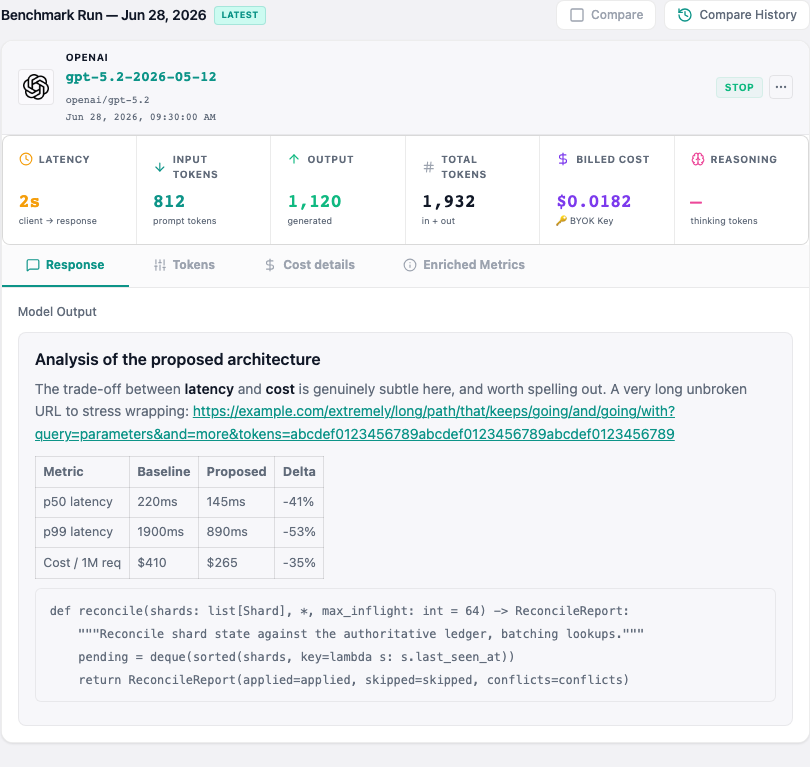
Every run is kept with far more than its answer. Months later, that is what lets you say why a model improved — it got cheaper, it got faster, or the provider quietly swapped it for a newer version.
 Full size
 What gets recorded
- What it cost you, down to the fraction of a cent
- How long it took to start answering, and how fast it wrote
- How much text went in and came out
- Which exact version of the model answered — providers update them silently
- Whether the answer finished properly or was cut off
When a result is flagged
A model answering is not the same as a model answering well. We mark a run as worth a second look when:
- It was cut off before finishing
- It was blocked by the provider’s safety filter
- The model declined to answer
- It got stuck repeating itself
- It missed the checklist you set on the capsule
What you can do with a result
If an answer was cut off, you can ask the model to carry on from where it stopped, or run it again with more room — which gives you a fresh result and leaves the original untouched. Results you would rather not count can be archived: they leave your timeline and your averages, but they are never deleted behind your back.
Compare models
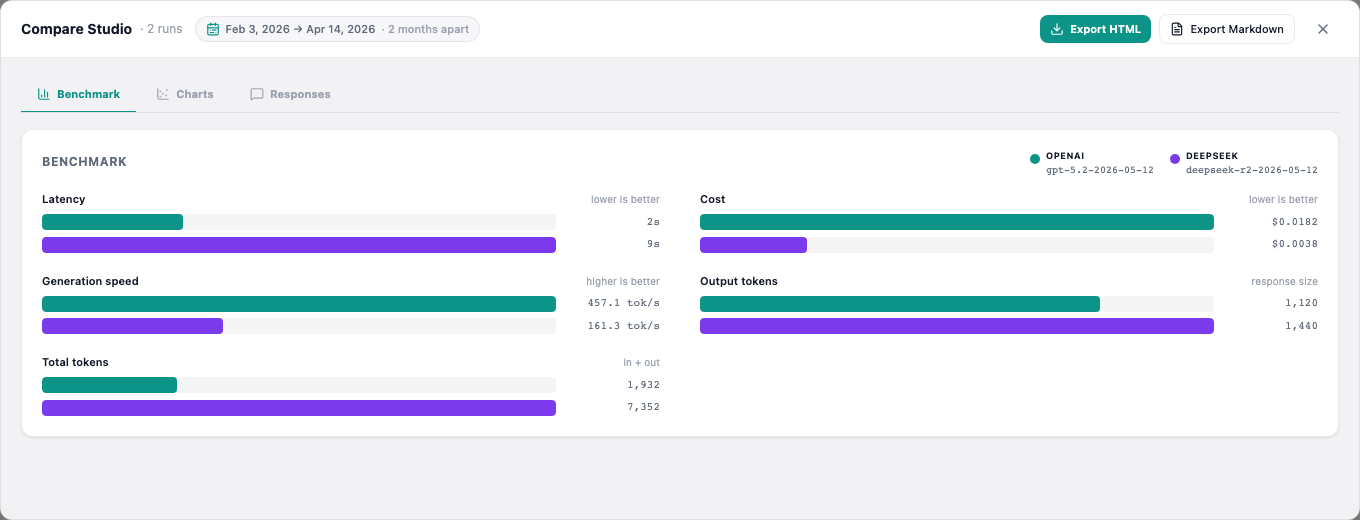
Tick Compare on two or more results and open the Compare Studio. Speed, price and length line up as bars, so the trade-off is obvious at a glance.
 Full size
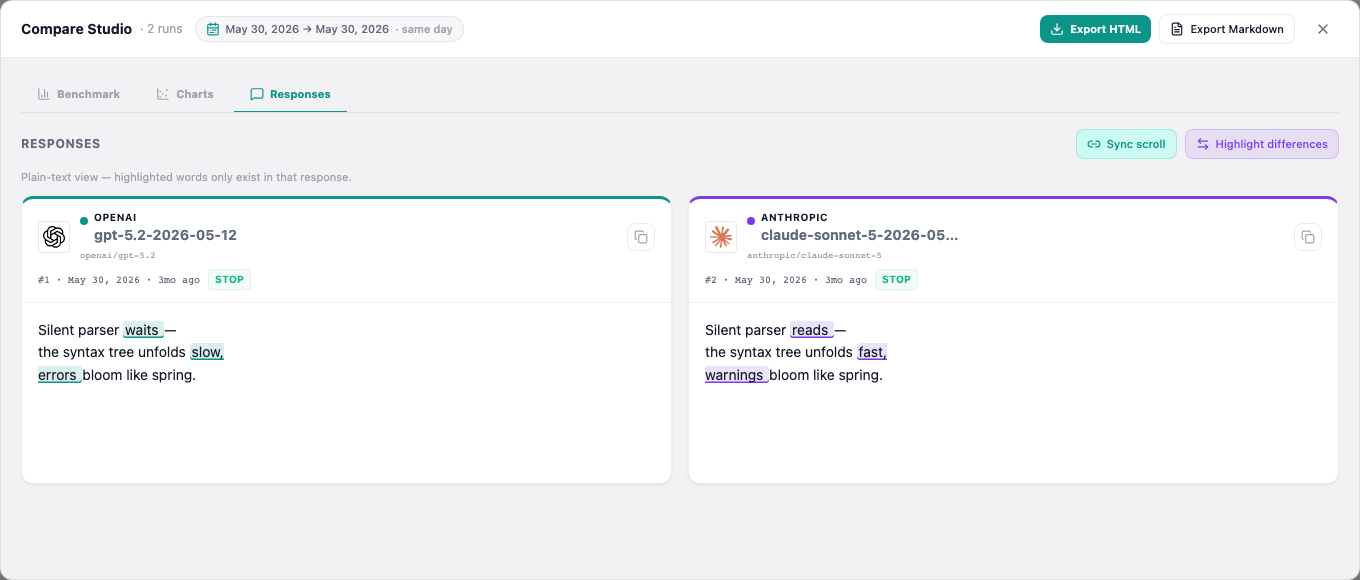
 When you compare exactly two answers, you can highlight what changed between them, word by word — the quickest way to see whether a new model really said something different or just reshuffled the same points.
 Full size
 To judge the results by eye, open Bento in the studio's header: every page, image or answer becomes a tile in a full-screen mosaic, with the model's name only on hover — or hidden altogether in blind mode. Click a tile to see it full size, then use the arrow keys to go from one model to the next. Only one page runs at a time, so even dozens of heavy results won't slow your browser down.
The same model, over time
Compare History pulls together every run of one model on this capsule, so you can watch it drift across months — which is the reason this whole thing exists.
Taking it away
Export the comparison as a web page to read or send to someone, or as a text file if you want to hand the whole thing to another AI for a second opinion.
One thing we deliberately do not do: crown a winner. Numbers alone cannot tell a good answer from a fast refusal — a model that replies "I can't help with that" in one second would win on speed every time. You get the figures and the answers side by side; the judgement stays yours.
Keys and privacy
Your OpenRouter key
Your questions go from your browser straight to the model — they never travel through our servers, and we never see them. Your key is stored in your browser and saved to your account so it follows you between devices. It is scrambled rather than protected by a password only you know, so treat it the way you would any key saved in a website: give it a spending limit on OpenRouter, and replace it if you ever stop trusting the computer you saved it on.
Never put a password or key inside a question
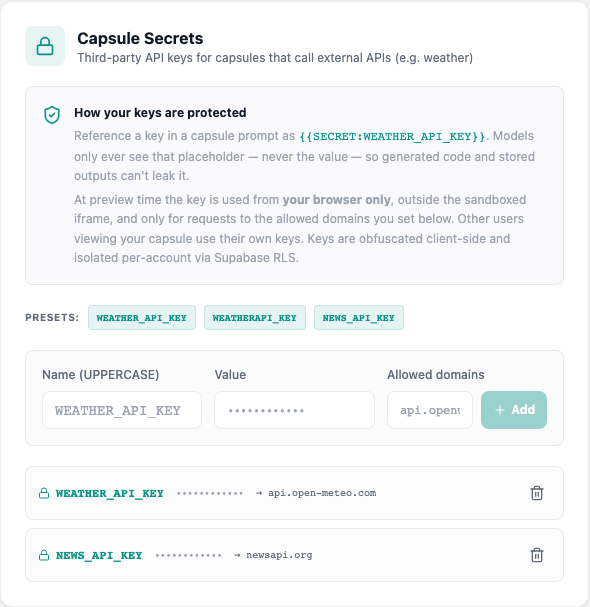
A question is sent to every model and locked forever — and if the capsule is public, anyone can read it. When your question needs a key, save it in Settings and drop in a placeholder instead, like {{SECRET:MY_KEY}}. Only the placeholder is stored; the real key is filled in at the last moment, and only for the websites you allowed it to reach.
Paste something that looks like a real key and we will spot it and offer to swap it for a placeholder in one click, before it can be saved.
 Full size
 What "public" really means
Making a capsule public shows everyone its title, its question, your notes and all its results — answers, costs and speeds included. Search engines can find it too. Files attached to a private capsule stay private. You can go back to private at any moment, even after the capsule is locked.
Want to see one first?
Have a look at what other people have locked away. No account needed.